


FaceTool: AI Face Swap Videos
3.89.00 Reviews
App Specs
- Version
- 1.1.81
- Updated On
- License
- Free
- Downloads
- 10,000+
- Developer
- SuTV
- Categories
- Photography
- Platform
- Android
Screenshots
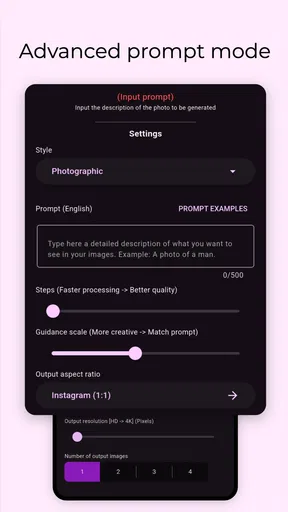
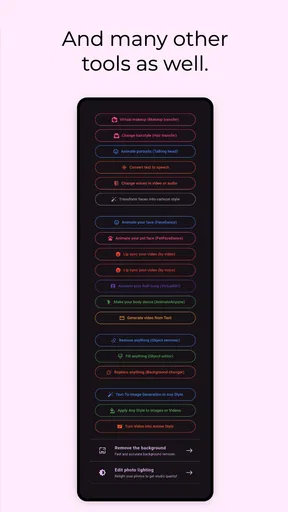
 Analysis by AppCompare
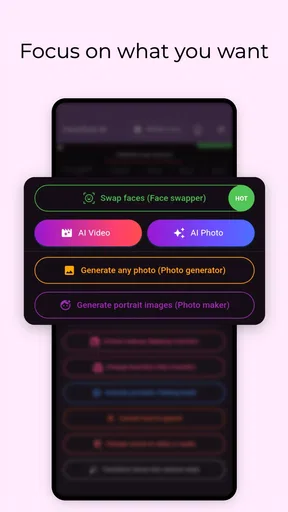
FaceTool: AI Face Swap Videos is the kind of photography app I would open when a normal selfie editor feels too limited. Instead of stopping at filters or color adjustments, it focuses on changing faces in photos and videos, creating portrait-style images, trying lip-sync effects, and experimenting with voice cloning. That makes it more of a creative playground than a traditional camera or retouching tool.
After using it, my impression is fairly clear: it can be entertaining and useful for quick social content, but it is not the app I would choose for careful professional editing or for anyone who wants a completely predictable result every time. Its appeal comes from fast, attention-grabbing transformations. Its weaknesses come from the same place: AI effects can look uneven, and the more ambitious the edit, the more important the original image or video becomes.
The app is free to install, which makes it easy to try without committing money at the start. It is developed by SuTV, is listed for everyone, and works on Android devices running version 7.0 or later. Its current version is 1.1.81. The app has reached over ten thousand installs and holds a 3.8 average from around two hundred fifty ratings, so I would describe it as a small but established creative tool rather than a universally proven editor.
How FaceTool works in real creative projects
I find FaceTool most useful when I plan the edit around the material I already have, rather than expecting it to fix a difficult clip. For a small project, I’d choose one clear portrait, decide whether the goal is a still image or a short moving effect, and keep the original untouched so I can compare the result. That practical approach also makes it easier to judge whether the app’s creative workflow suits me.
A face-swap editor aimed at quick experiments
The central idea is simple: choose a suitable image or video, apply a face-focused effect, and review the generated result. In practice, the quality depends heavily on the source material. A front-facing portrait with a visible face, even lighting, and a reasonably clear expression gives the system much more to work with than a side profile, a dark snapshot, or a clip where the subject turns rapidly.
I found that this changes the way I would use the app compared with a standard photo editor. With a conventional editor, I can usually predict how cropping, exposure, or sharpening will affect a picture. Here, I need to think like a producer first. I would select the source carefully, avoid cluttered backgrounds when possible, and keep the main face large enough in the frame. Those small choices are more valuable than repeatedly applying the effect to a poor source.
The video angle is particularly interesting because a moving face creates more opportunities for an entertaining result, but also more chances for visual inconsistency. A short clip with a steady camera and a person looking toward the lens is a sensible starting point. I would not begin with a long group video or a scene full of overlapping faces. The app is better suited to a controlled, short experiment than to repairing complicated footage.
Worth Reading Before You Choose

Flipboard Shows What News Apps Must Do Beyond the Feed

Switching to Android Auto Means Rethinking Your Driving Routine

Google Calendar Makes a Crowded Week Easier to Manage

Ludo King Makes the Most of the Minutes Between Plans

Baby Panda World Brings Quick Play to Modern Phones, but Its Game Library Feels Busy

ESPN’s Live Game View Makes Following Close Games Easier
Portrait creation is more than a simple filter
The portrait tools give the app a different use from a novelty face-swap generator. If I wanted a stylized profile image, a playful character portrait, or a new version of a familiar selfie, I could use FaceTool before sharing the result elsewhere. The important distinction is that this is not the same as manually retouching skin or adjusting contrast. The app is changing the identity or presentation of the image, so the result should be treated as a creative interpretation rather than a faithful photograph.
That distinction matters in everyday use. For example, I could take an ordinary portrait from a family gathering and turn it into a lighthearted themed image for a private group chat. I would keep the original file untouched, compare the generated version with it, and only share the edited copy after checking that the face still looks natural enough for the audience. This workflow avoids the common mistake of treating an AI transformation as if it were automatically ready to publish.
For a personal avatar, I would also create several variations rather than relying on the first output. Small changes in expression, framing, or source photo can make a noticeable difference. The app is more enjoyable when I approach it as a set of creative attempts, not as a one-click replacement for a carefully photographed portrait session.
Lip-sync and voice features need responsible handling
Lip-sync effects and voice cloning make the app more ambitious than a basic face editor. They can help create humorous short clips, character experiments, or visual messages that would be difficult to produce manually on a phone. At the same time, these features deserve more care than a harmless color filter because they can make someone appear to say or do something they never recorded.
My practical rule would be to use these tools only with my own material or with clear permission from the people represented. I would label an obviously artificial clip when sharing it publicly, especially if the voice or face could be mistaken for a real statement. That is not just a question of good manners; it also protects the person watching from confusing a generated joke with genuine footage.
For a private creative project, the combination can be effective. I could build a short birthday greeting using an approved portrait and a voice recording, then review the mouth movements and timing before sending it. I would keep the message short, because unnatural timing becomes easier to notice as the clip gets longer. The best results are likely to come from simple, clearly staged ideas rather than complicated dialogue or crowded scenes.
What the free entry point really means
FaceTool is free to download and try, which is its strongest value advantage for curious users. I can explore the basic experience without first paying for an editor I may abandon after a few minutes. That is especially useful here because AI-based creative tools are personal: one person may enjoy the style immediately, while another may find the results too artificial.
There are also in-app purchases ranging from $1.99 to $64.99 per item. I would therefore treat the free access as an opportunity to test the workflow, not as a promise that every possible output is included at no cost. Before purchasing anything, I would check which part of the creation process requires payment and whether the particular effect I want is available without an upgrade. The broad price range means the difference between casually trying the app and investing heavily in it can be substantial.
For me, that makes the correct order obvious: install it, test a few representative photos and a short video, inspect the export experience, and only then consider spending money. If the free portion already produces the kind of result I want, there may be no reason to pay. If my main interest is locked behind a purchase, I would compare that cost with the price and reliability of a more established editor before committing.
Where it fits among ordinary photography apps
Compared with a standard photo editor, FaceTool offers more dramatic changes but less manual control. Apps built around cropping, layers, color correction, and retouching are better when I need to make a product photo accurate, prepare a polished headshot, or correct a specific visual problem. Those tools let me decide exactly what changes. FaceTool is more useful when the goal is transformation, surprise, or playful storytelling.
Compared with a conventional camera app, it is not really competing for the same job. A camera app helps me capture a clean original. FaceTool works after capture, using that original as material for a generated result. I would use the camera first and this app second, rather than expecting it to replace a good shooting setup.
It also differs from social platforms that include built-in face effects. A social app may be faster for an immediate post, while FaceTool is more focused on creating an edited asset that I can review before deciding where to share it. That extra step is useful when I want to save several versions or send a finished clip to a particular group, although it can feel slower than applying a live effect while recording.
The tradeoffs I noticed before recommending it
The biggest tradeoff is control versus speed. FaceTool promises an accessible route to complex-looking edits, but the user gives up some of the precise control available in a desktop editor or a layer-based mobile application. If the face alignment is slightly off or the expression changes in an odd way, I may have to try a different source instead of correcting the problem by hand.
Source quality is another practical limitation. A low-light photo, a face partly hidden by hair, or a video with fast movement can make the result less convincing. This is not a reason to blame the app for every poor output; it is a reason to choose material that matches the task. Still, users expecting the app to rescue any image may be disappointed.
The creative tools also raise a privacy and trust consideration in everyday use. Since the app deals with faces, voices, and identity-like edits, I would avoid uploading material involving other people unless they understand what I am making. I would also keep generated clips separate from original memories so that an altered version cannot accidentally replace the authentic file in my personal archive.
The 3.8 average suggests a mixed experience among its current audience. I read that as a reason to keep expectations realistic rather than as an automatic rejection. The app can be fun when its strengths match the project, but it may not satisfy someone searching for flawless, studio-quality output from every input.
Who is most likely to get value from it
I think FaceTool is a good fit for casual creators who enjoy trying unusual photo and video effects without learning a complex editing program. It suits someone making a funny birthday clip, a themed portrait for a chat, a playful social post, or a short visual experiment. The free starting point makes it especially reasonable for users who want to explore before deciding whether the style is worth paying for.
It may also help creators who have an idea but lack the time or skill to build the effect manually. A person planning a short comedy sketch could use a face transformation to establish a character quickly. Someone managing a small social account could test several portrait concepts and choose the one that best fits the tone of a post. In both cases, I would still review the output carefully instead of publishing automatically.
I would recommend skipping it if the goal is accurate retouching, professional color work, dependable identity preservation, or detailed frame-by-frame control. Photographers preparing client images will probably prefer an editor that keeps every adjustment visible and repeatable. I would also skip it if I only want a camera with natural-looking enhancements; FaceTool is built around noticeable changes, not subtle capture.
Parents and younger users should remember that an everyone age rating does not remove the need for judgment around other people’s images or voices. The tools can be harmless in a clearly fictional context, but a realistic-looking alteration can still cause confusion or embarrassment. I would use it with consent and keep public sharing separate from private experimentation.
My practical workflow for getting better results
I would begin with one well-lit portrait and one very short video rather than importing a large collection. This makes it easier to understand how the app handles my material and prevents me from spending time on unsuitable files. I would keep the face unobstructed, choose a steady frame, and avoid testing several variables at once.
Next, I would save the original and compare each generated version side by side. For portraits, I would check the eyes, mouth, hairline, and overall proportions. For video, I would watch the transition from beginning to end instead of judging only the thumbnail. A result that looks convincing in a still preview may become distracting once the subject moves.
For lip-sync or voice-based work, I would write a short script with simple timing and use a voice that I have permission to reproduce. I would listen for unnatural pauses and watch whether the mouth movement matches the spoken rhythm. If the effect looks better as a brief punchline than as a full conversation, I would shorten the concept rather than forcing the app to handle more material.
Finally, I would decide whether the result actually needs to be shared. Some generated images are most successful as private jokes or creative drafts. The ability to make an effect does not automatically make it worth posting, and a quick review for misleading context can prevent an otherwise fun edit from being misunderstood.
My verdict on paying for the experience
My recommendation is to start with the free experience and judge it against one specific project. That is the fairest way to evaluate value because the app’s usefulness depends on whether its face, portrait, lip-sync, and voice tools match your style. If you only want occasional amusement, free access may be enough. If a paid effect becomes central to a repeated creative workflow, then the purchase could make sense, but only after checking exactly what it unlocks.
I would not buy an expensive item simply because the first result looks impressive. I would test several source types, confirm that the output quality is consistent enough for my purpose, and compare the result with ordinary alternatives. A manual editor may take longer but offer better control, while a built-in social effect may be quicker for a one-off post. FaceTool earns its place when its particular transformation saves effort or creates an idea those alternatives cannot deliver as easily.
Overall, FaceTool: AI Face Swap Videos is worth trying for playful photography and short-form creative work. I like its broad range of face-centered experiments and the low barrier created by free installation. I would keep my expectations moderate, protect original files, obtain permission before using someone else’s likeness or voice, and treat paid features as optional rather than necessary. For a friend who wants entertaining AI edits on a phone, I would recommend giving it a careful test; for precise professional editing, I would point them elsewhere.
Pros
- Creates convincing face swaps in short videos with minimal effort.
- Simple interface makes it accessible for users without editing experience.
- Processes photos and videos directly from a mobile device.
- Offers entertaining templates suitable for social media content.
- Previewing results before saving helps avoid unwanted exports.
Cons
- Realistic results depend heavily on good lighting and a clear source face.
- Some features and exports may require a paid subscription.
- Processing can take time
- especially for longer or higher-quality videos.
- Face-swapped content may raise privacy and consent concerns.
- Watermarks or export limits may affect free users.
FAQs for FaceTool: AI Face Swap Videos
What is FaceTool: AI Face Swap Videos, and how does it work?
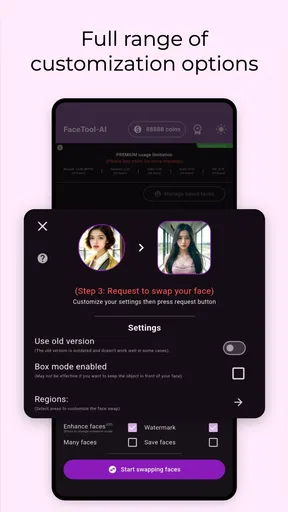
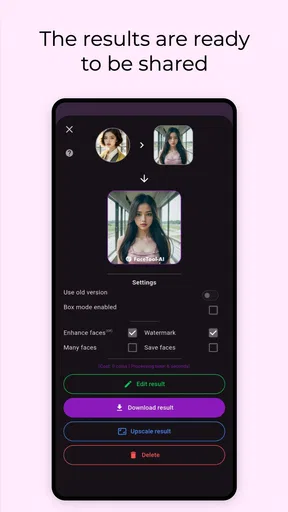
FaceTool: AI Face Swap Videos is an entertainment app that uses artificial intelligence to place a user’s face into selected photos or video templates. After choosing a compatible image or clip and uploading a clear selfie, the app processes the facial features and creates a replacement result. Processing quality can vary depending on lighting, face angle, image resolution, and the complexity of the template.
Is FaceTool: AI Face Swap Videos free to download and use?
The app may be available to download at no initial cost, but some templates, export options, processing features, or premium tools can require payment. Before using the service extensively, check the current in-app pricing, subscription terms, and whether a free trial automatically converts into a paid plan. Availability of features and prices may also differ between Android and iOS.
What type of photos or videos produce the best face-swap results?
For the most convincing results, use a well-lit selfie with your face looking directly toward the camera and without sunglasses, masks, heavy shadows, or extreme expressions. Templates with one clearly visible face generally work better than crowded scenes or fast-moving videos. High-resolution source images and a stable internet connection can also improve processing speed and final quality.
Does FaceTool upload my photos or videos, and is my personal data safe?
Face-swapping normally requires images or videos to be processed by the app’s systems, which may involve uploading files to remote servers. Before granting access, review the app’s privacy policy, permissions, retention practices, and information about third-party services. Avoid uploading sensitive photographs, children’s images, identification documents, or any content involving another person without their clear permission.
Can I share FaceTool creations on social media, and are there any restrictions?
FaceTool creations can generally be saved or shared through the device’s standard sharing options, depending on the selected feature and export settings. However, users should respect copyright, publicity rights, privacy, and platform rules when publishing edited content. Do not use someone else’s face to mislead viewers, harass them, impersonate them, or create deceptive political, commercial, or harmful material.


